Offline Animated Image Studio for Mac — 100% Local
Preview, convert, and create high-quality GIF, APNG, and WebP animations. Remove video backgrounds instantly with local AI — no cloud uploads.

Only ~3MB • Runs fully on your Mac • No internet required


Professional Privacy — Your Assets Never Leave Your Mac
No servers, no cloud exposure. Preview, convert, and render high-resolution animations fully offline. Your source assets, client deliverables, and NDA projects stay completely secure on your Mac.
100% Local Processing
AI segmentation runs on-device with Apple Vision on your Mac — including Neural Engine acceleration where available. Your creative assets never leave your local environment, supporting strong privacy expectations.
Zero Data Logging
We don't track your usage, we don't collect your files, and we don't run a backend for your media. TransMov is a native tool — not a cloud service.
Why Choose TransMov as Your Mac Animated Image Studio
100% Local Processing — No Upload Required
No servers, no cloud exposure. Preview, convert, and create high-quality animated images fully offline. Your sensitive client or NDA assets stay secure on your Mac.
Optimized for Apple Silicon — Fast, Real-Time Processing
Powered by the native Apple Vision framework and Apple Silicon Neural Engine acceleration for instant, production-ready results.
True Alpha Transparency & Export Control
Generate 8-bit alpha channels for APNG and WebP to integrate flawlessly into web or app UIs, plus optimize GIF color palettes to easily reduce file sizes.
An All-in-One Native Animated Image Studio
TransMov combines four essential animation tools into a single native workflow, covering your entire creation, conversion, and preview needs locally on macOS.
Video to Animation
Convert MP4 and MOV videos straight to GIF, APNG, or WebP. Trim time ranges, crop frame areas, and customize output dimensions to fit your exact specifications without any background removal.
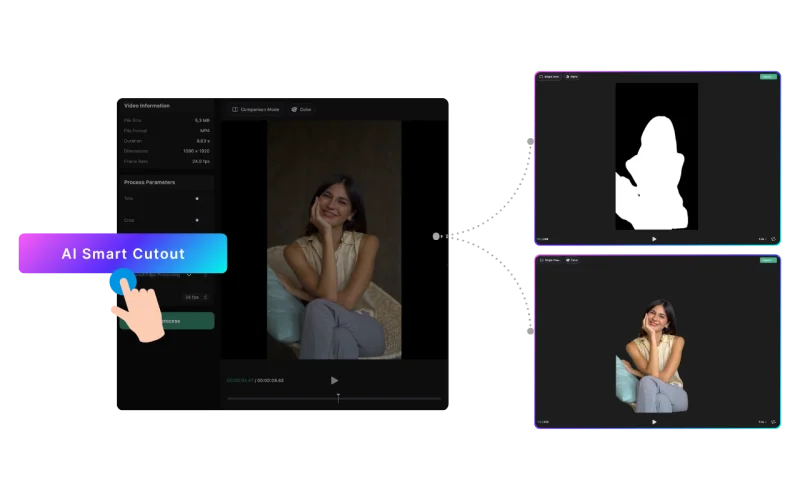
AI Background Removal
Erase video backgrounds offline using local AI or chroma keying. Inspect results frame-by-frame, swap background colors or custom images, and export with true alpha transparency.
Format Converter
Convert existing files among GIF, APNG, and WebP formats. Check playback details in real time while adjusting export sizes, GIF color palettes, or WebP quality to optimize your files.
Frame Previewer
Open any animated file to inspect file sizes, color modes, exact frame counts, and transparent boundaries using checkerboard previews—fully optimized for viewing without making edits.
From Video to Transparent Animation in 3 Steps
No upload. No setup. Just drag, process, export.
Drop your file
Drag & drop. No uploads.
AI magic
Instant AI isolation. Powered by Neural Engine.
Save & Use
Pro export. Ready for any platform.
Built for How You Ship
From experimental AI workflows to standard production assets.

The New Standard for AI Motion
AI tools like Runway and Luma generate stunning visuals, but they come with messy backgrounds. TransMov bridges the gap, converting raw AI video into ultra-lightweight, transparent assets ready for instant deployment.

App UI & Interaction
Layer transparent motion directly on real UI — ideal for onboarding, hover states, and feedback animations with a full alpha channel.

Social & Overlays
Quickly create transparent stickers and overlays for social video production without opening After Effects.
Technical Standards
Built for high-end production environments with no quality compromise.
| Capabilities | TransMov (Native AI) | Legacy Cloud Services |
|---|---|---|
| Max Resolution | Original Quality (No Limit) | Often capped (e.g., 720p) |
| Data Privacy | 100% Offline (On-Device) | Stored on 3rd-party servers |
| Transparency | 8-bit Pro Alpha Channel (APNG/WebP) | 1-bit or restricted GIF |
| Data Ownership | You own it | Terms may vary |
| Pricing Model | Lifetime Buyout Available | Monthly / credit-based |
💡 Comparing local vs cloud workflows? See the decision guide →
Simple, Native Pricing
Professional tools shouldn't come with hidden cloud costs.
Stop paying for monthly cloud credits.
Monthly Subscription
Full access. Cancel anytime.
Annual Subscription
Lower effective monthly cost for regular use.
Lifetime Access
Own the tool, keep your privacy. Forever.
One payment, lifetime local access.
* Final price is shown in the App Store and may vary by region.
Comparison of Features
| Capability | Free | Pro (subscription/lifetime) |
|---|---|---|
| Unlimited Video Duration | × | ✓ |
| Export Formats | GIF | APNG / GIF / WebP / PNG Sequence |
| Watermark-Free Export | × | ✓ |
| Custom Resolution | × | ✓ 100 - 4096px |
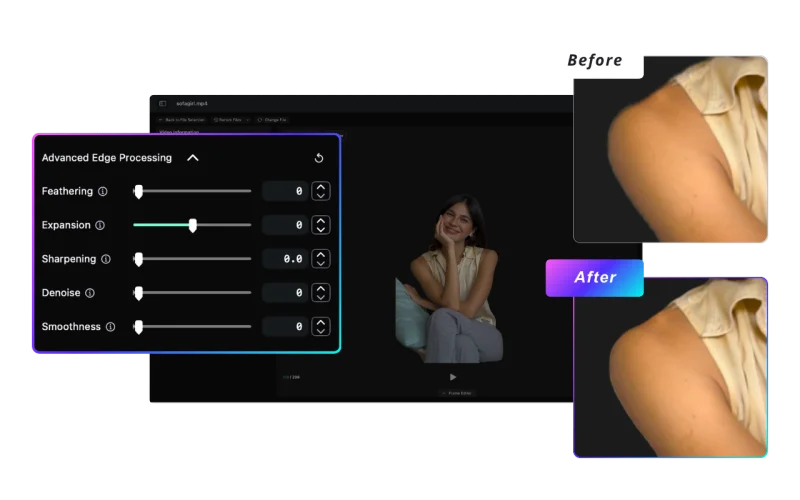
| Advanced Edge Tools | × | ✓ Feather / Scale / Sharpen / Denoise / Smooth |
| Spatial Crop (Reframing) | × | ✓ |
| Frame Editor Eraser | × | ✓ Erase leftover background per frame |
| Matting Modes | AI / Chroma Key | AI / Chroma Key |
| Background Replacement | 20 Solid Colors | 20 Solid Colors / Gradient Presets / Custom Images |
💡 Not sure which format to choose? Read our deep dive: APNG vs. GIF: Which is better for your project? →
The Native Advantage
TransMov was born from a simple need: a professional-grade, one-time payment tool for Mac users that respects privacy. We don't believe in cloud subscriptions for tasks your Mac can handle locally.
Resources & Guides
Start with TransMov
Understand how TransMov fits into real production pipelines from AI generation to final assets.
AI-to-Asset Pipeline
AI-generated video is too heavy for production use. This workflow shows how TransMov converts it into lightweight, usable assets.
Web Design Workflows
How to integrate transparent animations into modern UI and product design systems.
Online Tools
Preview animated images in your browser — Files stay on your device.
GIF Viewer
Drop a GIF to preview animation, size, and dimensions in your browser.
APNG Viewer
Preview animated PNG (APNG) with alpha transparency — no upload required.
WebP Viewer
Open animated or static WebP files instantly in your browser.
Format & Platform Guides
Compare animation formats and learn how to ship transparent assets across platforms.
GIF vs APNG vs WebP
Compare formats by transparency, file size, and compatibility to pick the right output.
Convert Video to Transparent APNG on Mac
Turn MP4 or MOV into high-fidelity transparent APNG locally — 100% offline, perfect for iOS Safari compatibility.
Framer & Webflow Transparent Animation Guide
Fix iOS Safari black-box bugs and ship lightweight transparent APNG and WebP assets for modern web stacks.
Decision Guides
Compare tools and approaches to choose the right workflow for your project.
Best Mac Tools for Video Background Removal
Start from the ecosystem map to quickly find which tool category matches your workflow.
Local vs Cloud Video Background Removal
Understand when local processing is better than cloud AI tools, and when it is not.
When NOT to Use TransMov
Clear boundaries of what TransMov is not designed for, and which tools to use instead.
Is After Effects Overkill?
Skip the Adobe loading screen. Get local video background removal on Mac without subscriptions or cloud uploads.
Why Local AI Matters
Why on-device processing is becoming the standard for modern creative tools.
Frequently Asked Questions
How can a ~3MB app deliver high-quality animations?
A small download doesn't mean compromised quality. TransMov is built natively for macOS, so it doesn't need to pack a large cross-platform runtime. That keeps the app light, while still letting you preview animations smoothly and export to APNG, GIF, and WebP—all on your Mac.
How do I convert a video to APNG on macOS?
You can convert a video to APNG by importing your video into TransMov, selecting APNG as the output format, and exporting the animation. Everything is processed locally on macOS.
Does GIF support transparency?
GIF only supports 1-bit transparency (fully on or off), which can cause jagged edges. Formats like APNG and WebP support full alpha transparency for smoother and more natural results.
What is the difference between APNG and GIF?
APNG supports full color and alpha transparency, while GIF is limited to 256 colors and basic transparency. APNG generally produces higher-quality animations, especially for UI and gradient-heavy content.
Can I remove video backgrounds locally on Mac?
Yes. TransMov uses the Apple Vision framework and on-device processing to remove video backgrounds without uploading files, ensuring privacy and fast performance.
Which format is best for web animations?
It depends on your needs. GIF is widely supported, APNG offers better quality with transparency, and WebP provides better compression in many cases. For UI and design assets, APNG or WebP are often preferred.
All the Tools You Need for Animated Images
Download TransMov to preview, convert, and create high-quality animations seamlessly and fully locally on your Mac.
Version 2.3 · macOS 14 or later